AI-Powered Sales Call Assistant
Real-time AI coaching for every stage of your sales call — from discovery through closing. Qualify faster, handle objections confidently, and close more deals.
How Sales Call Mode Works
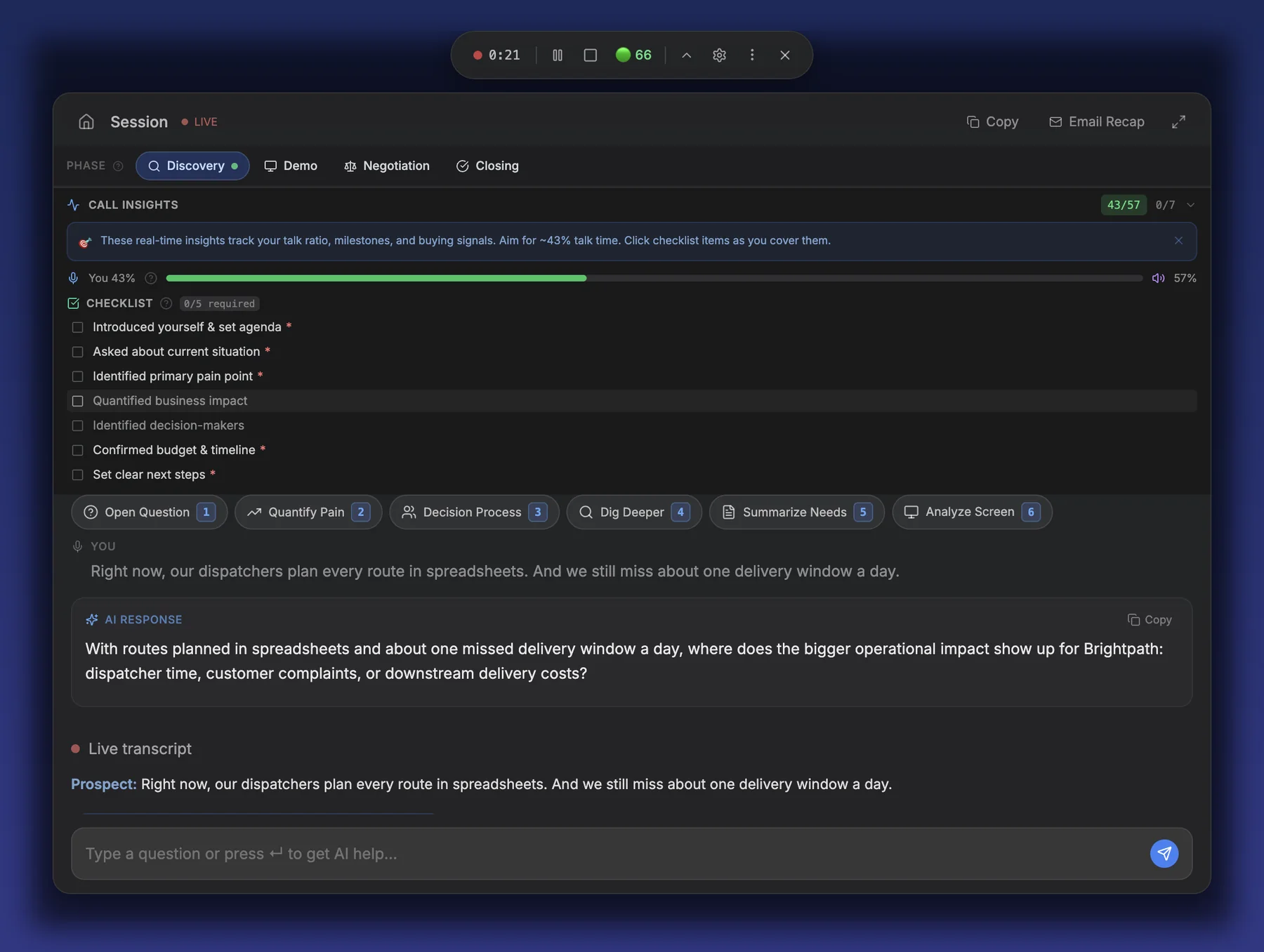
Sales Call mode listens to your live sales conversation and provides real-time coaching tailored to the current stage of the call. The mode is organized into four sub-modes — Discovery, Demo, Negotiation, and Closing — each optimized with stage-specific AI suggestions, quick actions, and deal intelligence. Before the call, fill in the Prospect Briefing Form so the AI understands who you are selling to. During the call, use the Sales Workspace for quick reference, monitor the Talk-to-Listen Ratio to stay balanced, and watch the Deal Signals Feed to read the room.
Watch the video
All videos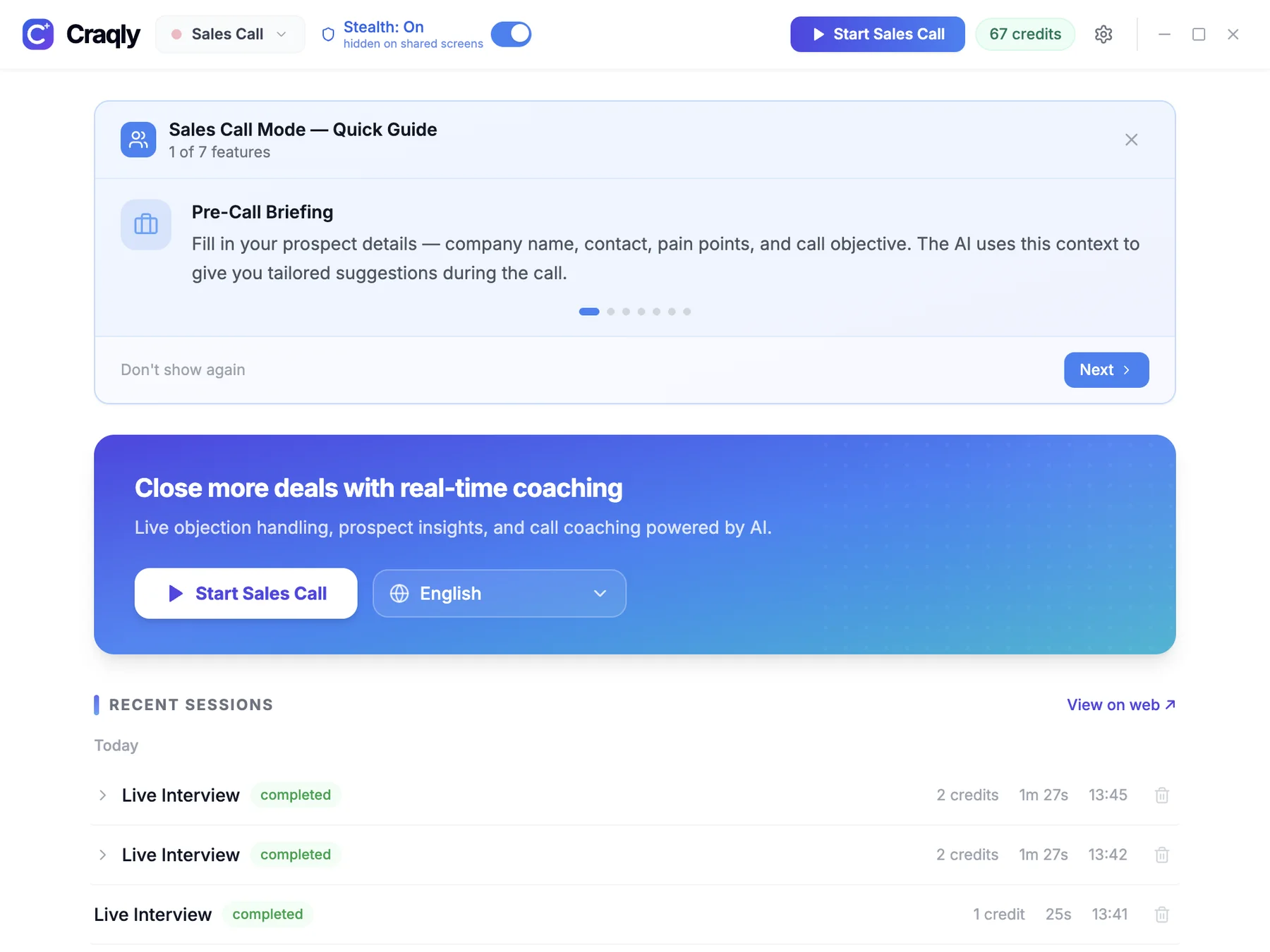
Sub-Modes
Each sub-mode adapts the AI's coaching to the current phase of your sales conversation
Discovery
Qualify prospects, uncover pain points, and quantify the business impact of their challenges.
What the AI Does
- AI-suggested discovery questions tailored to the prospect's industry
- Real-time pain point identification from prospect responses
- Impact quantification prompts to assign dollar values to problems
- Qualification framework guidance (BANT, MEDDIC, SPIN)
- Automatic note-taking of key insights and buying signals
Pro Tip
Let the prospect talk. Your goal is to listen 65-70% of the time during discovery. Ask open-ended questions and follow up on emotional cues.
Demo
Map product features directly to the prospect's pain points, handle questions live, and highlight differentiators.
What the AI Does
- Feature-to-pain-point mapping suggestions based on discovery notes
- Real-time objection handling with context-aware responses
- Competitive differentiator talking points surfaced automatically
- Question anticipation based on what the prospect is saying
- Demo flow suggestions to keep the presentation on track
Pro Tip
Never demo a feature without connecting it to a specific pain point the prospect shared. Lead with the problem, then show the solution.
Negotiation
Protect your margins, add value instead of discounting, and create urgency to move deals forward.
What the AI Does
- Value-based negotiation prompts instead of price concessions
- Counter-offer frameworks and alternative package suggestions
- Urgency creation tactics based on prospect's timeline
- Margin protection alerts when discounts go too deep
- Bundle and add-on suggestions to increase deal value
Pro Tip
Never discount without getting something in return. If asked for a lower price, offer to remove features or shorten the contract term first.
Closing
Summarize the value delivered, use assumptive closing techniques, and lock in concrete next steps.
What the AI Does
- Value summary generation from the entire conversation
- Assumptive close language suggestions
- Next-step commitment prompts to keep momentum
- Trial close detection to gauge readiness
- Follow-up action item generation for post-call emails
Pro Tip
Always leave with a scheduled next step. A verbal 'yes' without a calendar invite is not a close.
Quick Actions
One-tap actions available during any stage of the sales call
Qualify
Run a quick qualification check on the prospect based on conversation context
Handle Objection
Get AI-powered responses to the prospect's current objection
Pitch Value
Generate a value proposition tailored to the prospect's stated pain points
Close
Receive closing language and next-step suggestions for the current moment
Discovery Q
Get the next best discovery question based on what has been discussed
Analyze Screen
Capture and analyze on-screen content such as proposals, slides, or competitor pages
Special Features
Advanced tools built into Sales Call mode to give you an edge on every call
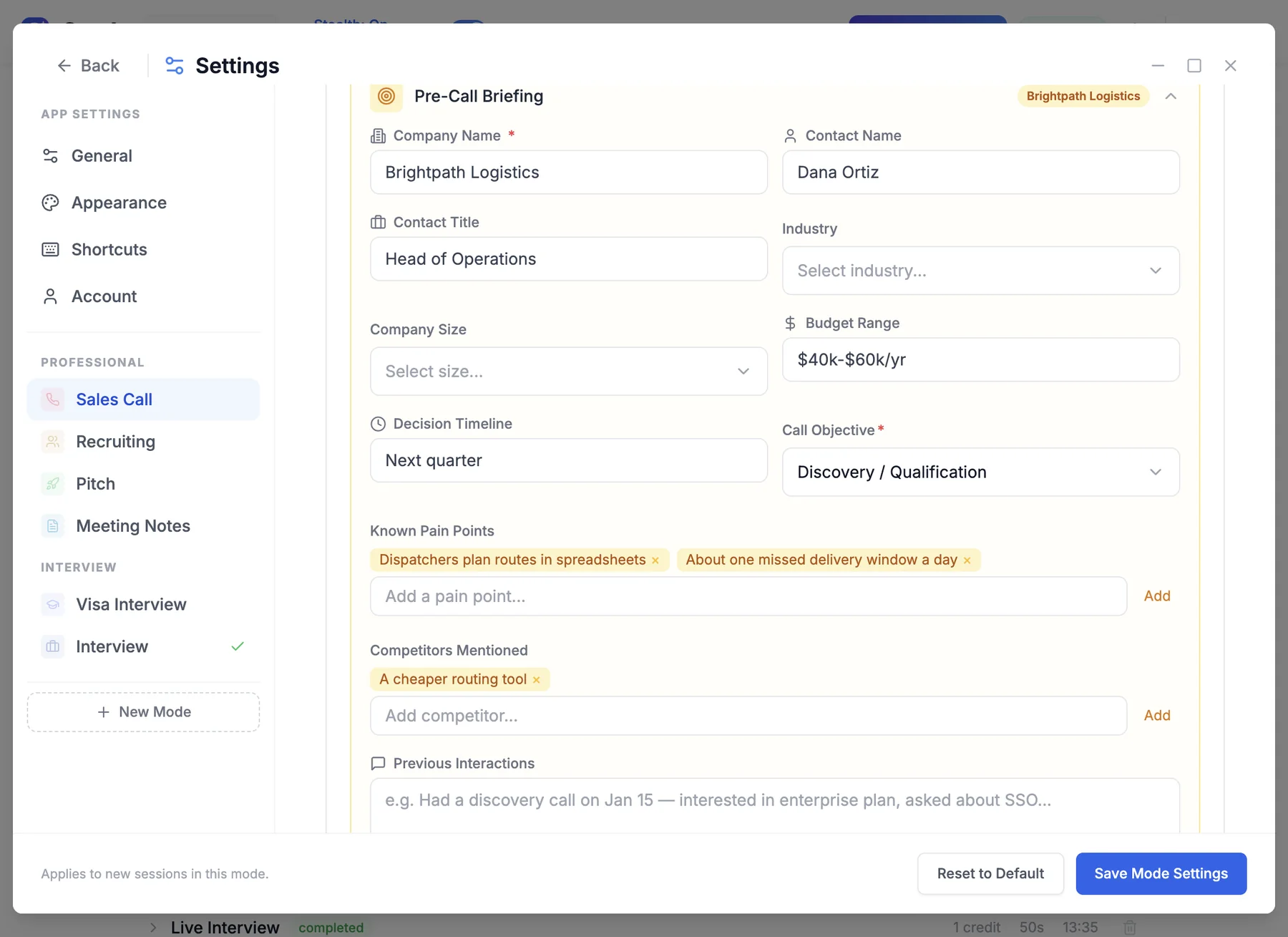
Prospect Briefing Form
Before the call begins, fill in key details about the prospect so the AI can provide highly personalized coaching throughout the conversation.
- Company name, size, and industry for contextual suggestions
- Contact name and role to tailor communication style
- Known pain points to prioritize during discovery
- Budget range to guide pricing and packaging recommendations
- Timeline and decision process to inform urgency tactics
- Competitors being evaluated for battle card activation
Sales Workspace
A persistent reference panel that keeps your selling tools at hand throughout the call.
- Product information and feature descriptions for quick reference
- Value propositions organized by persona and industry
- Common objection responses with proven counter-arguments
- Battle cards comparing your solution against specific competitors
Call Milestones
A visual progress tracker that follows the natural flow of a sales call: Discovery, Demo, Negotiation, and Closing.
- Each milestone includes a checklist of key activities to complete
- Visual indicators show which milestones have been covered
- AI suggests when it may be time to advance to the next stage
- Ensures no critical selling steps are missed during the conversation
Talk-to-Listen Ratio Gauge
A real-time gauge that displays the percentage of time you are talking versus the percentage the prospect is talking.
- Target range is 35-55% talk time for the rep
- Gauge updates in real time as the conversation progresses
- Color-coded feedback: green when in range, yellow or red when outside
- Helps reps build the habit of active listening and asking more questions
Monologue Alert
An automatic warning that triggers when the rep speaks for more than 60 seconds without prospect input.
- Visual and optional audio alert after 60 continuous seconds of rep talk
- Encourages reps to pause and re-engage the prospect
- Helps prevent prospect disengagement during demos and pitches
- Configurable threshold for different selling styles
Deal Signals Feed
A live feed that categorizes signals detected in the conversation to help you read the room in real time.
- Buying signals (green): phrases indicating interest, urgency, or intent
- Risk signals (red): hesitation, budget concerns, competitor mentions
- Objection patterns: recurring themes the AI tracks across the call
- Actionable suggestions appear alongside each detected signal
Speaker Identification
Automatically distinguishes between the rep and the prospect in the live transcript so the AI can provide role-appropriate coaching.
- Identifies who is speaking based on audio characteristics
- Labels transcript segments as Rep or Prospect
- Enables accurate talk-to-listen ratio calculation
- Allows the AI to tailor suggestions based on who just spoke
Keyboard Shortcuts
On macOS, replace Ctrl with Cmd for all shortcuts.
Tips for Sales Calls
Best practices to get the most out of AI-assisted selling
Fill Out the Prospect Briefing Before the Call
Spending two minutes on the briefing form before dialing gives the AI the context it needs to deliver relevant coaching from the first second of the call.
Watch the Talk-to-Listen Ratio
The best sales reps talk 35-55% of the time. If the gauge turns red, pause and ask a question. Prospects buy when they feel heard, not when they feel lectured.
Do Not Read AI Suggestions Verbatim
The AI provides frameworks and talking points, not scripts. Paraphrase suggestions in your own voice to keep the conversation natural and authentic.
Pay Attention to the Monologue Alert
If the alert fires, it means you have been talking for over 60 seconds straight. Pause, check in with the prospect, and ask if they have questions.
Use Sub-Mode Switching to Stay Organized
Switch sub-modes as the call progresses. Moving from Discovery to Demo to Negotiation to Closing ensures you cover every critical step and the AI adapts its suggestions accordingly.
Review Deal Signals After the Call
The deal signals feed is valuable both during and after the call. Review the green and red signals post-call to refine your follow-up strategy and identify risks early.
Ready to Close More Deals?
Download the Craqly desktop app and start your next sales call with AI-powered coaching by your side.